
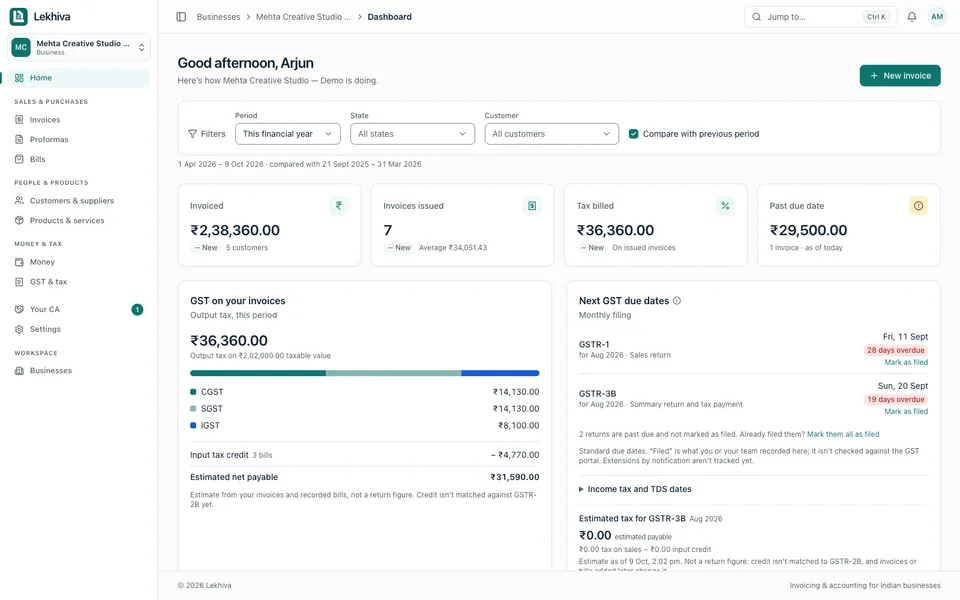
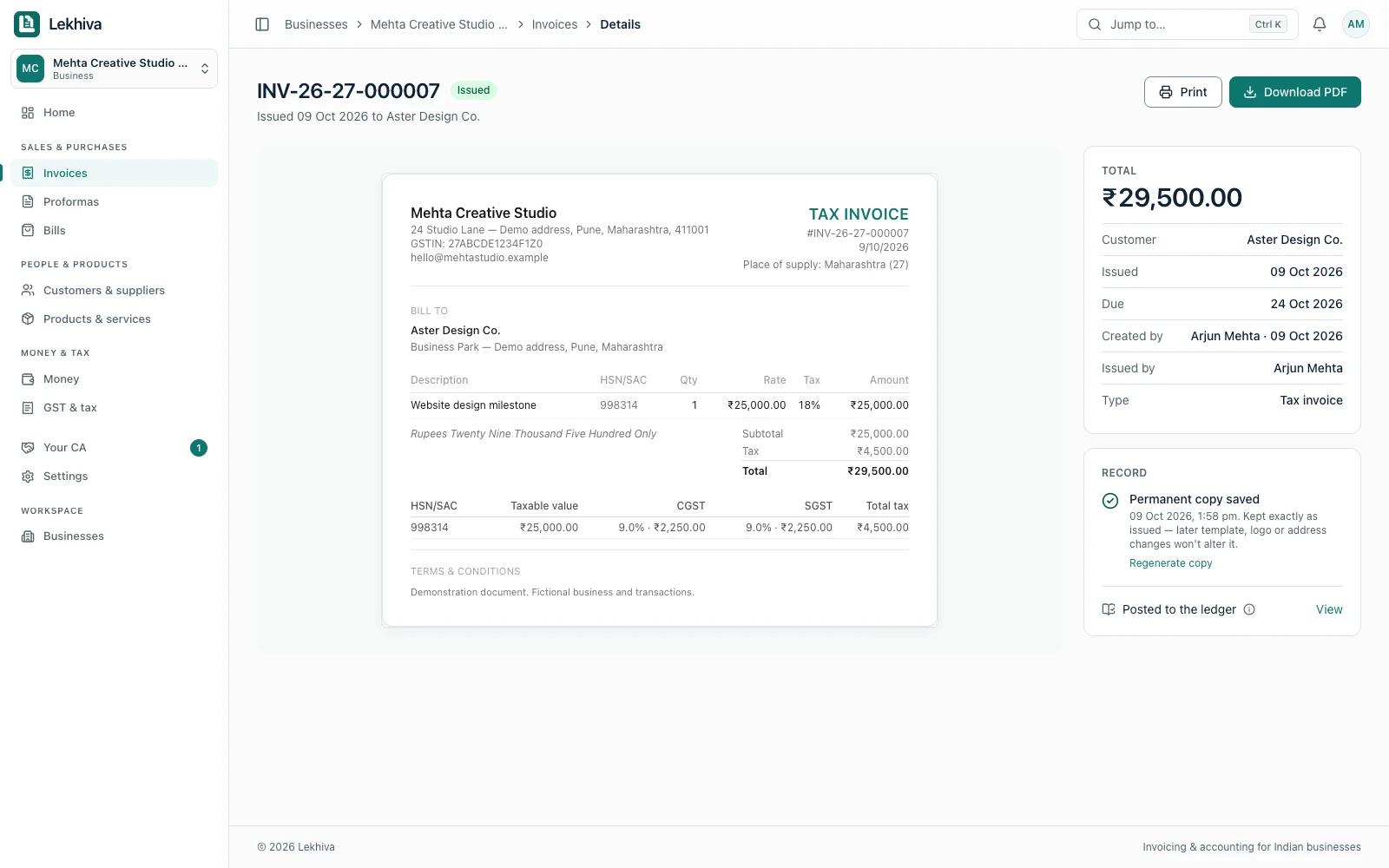
Bill for the work you deliver
Choose a saved customer and service, review GST, and issue a downloadable invoice. Keep proforma revisions for the work agreed before billing.
Lekhiva is a GST invoicing and accounting application for Indian service businesses and their CAs. Create GST invoices, track what clients still owe, and keep expenses ready for your monthly review. Your CA works from the same records, with access you approve.
Free plan available · Business plan benefits free until 31 December 2026
See the real app below: issue an invoice, record a receipt and organise the review with your CA. Sign up free; check pricing for features and limits by plan.
Choose a saved customer and service, review GST, and issue a downloadable invoice. Keep proforma revisions for the work agreed before billing.
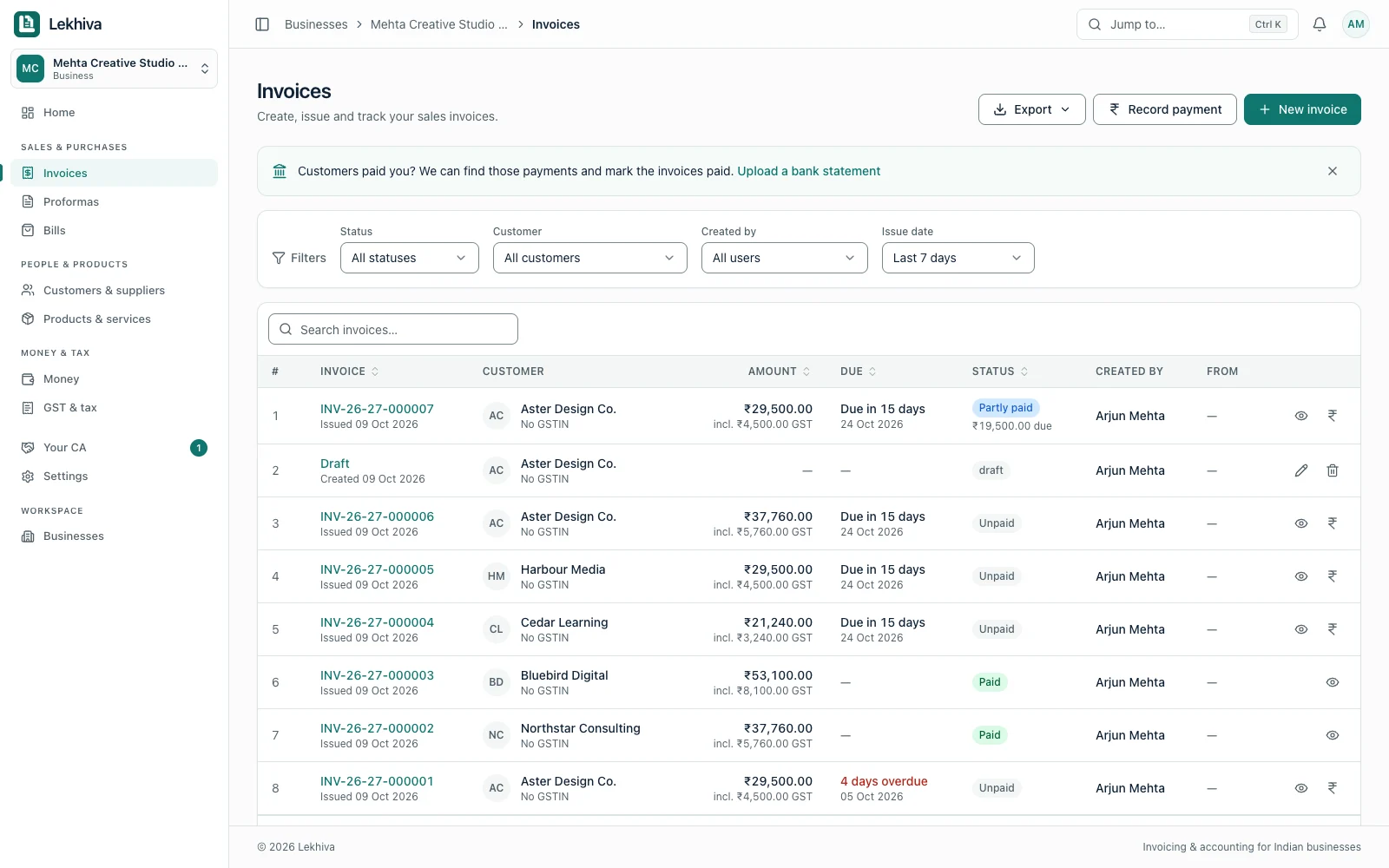
A ₹10,000 receipt against a ₹29,500 invoice leaves ₹19,500 outstanding. Record the payment against the invoice and keep the balance visible for your next follow-up.
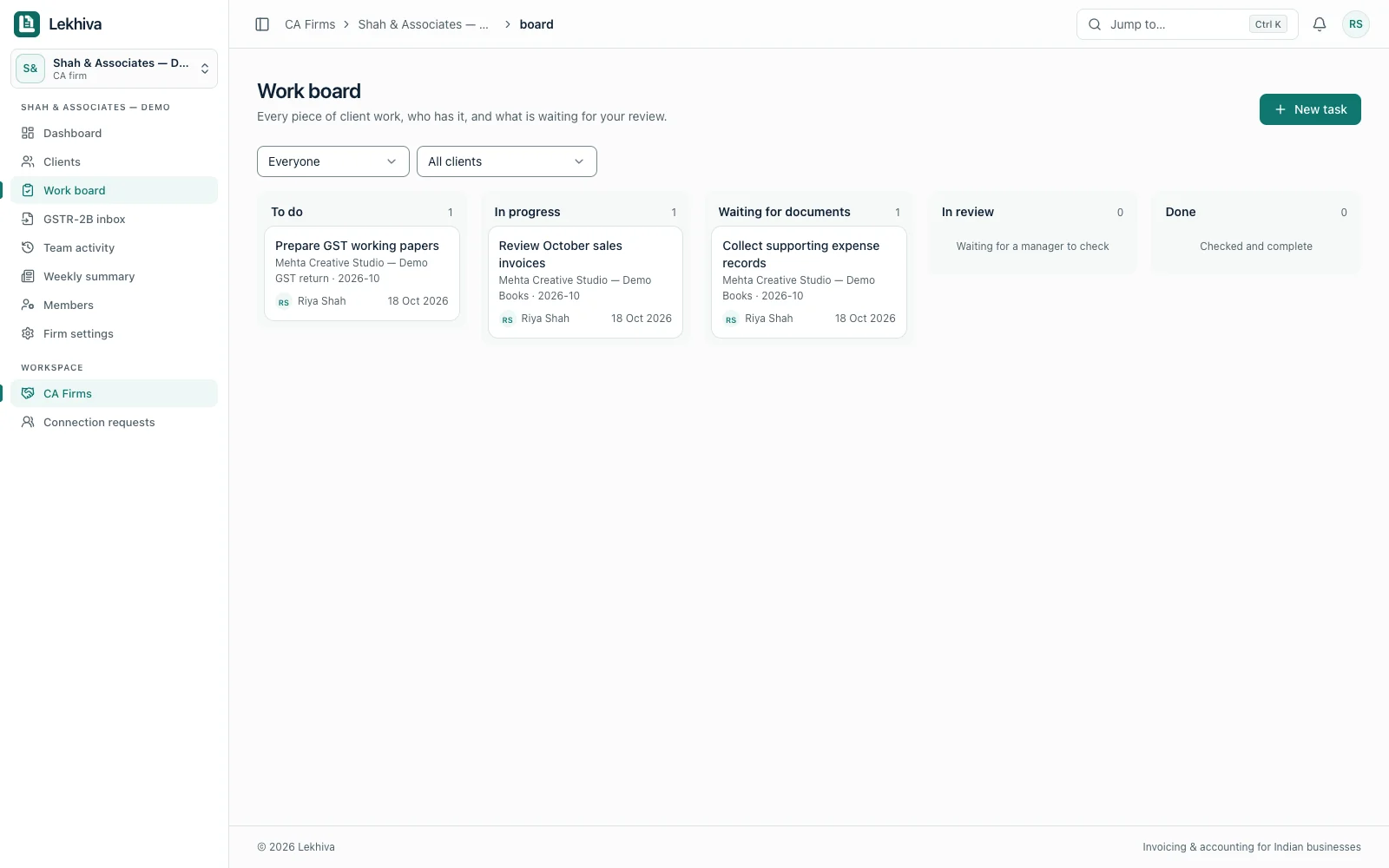
Give your CA approved access to your records. Their work board keeps client tasks and missing documents visible, so both sides know what needs attention.
Actual app screens with fictional demo records. Select a screenshot to view it at full size.
A business owner approves a CA connection. Assigned firm staff can then review authorised records, request missing documents and track monthly progress.
Explore the CA workspace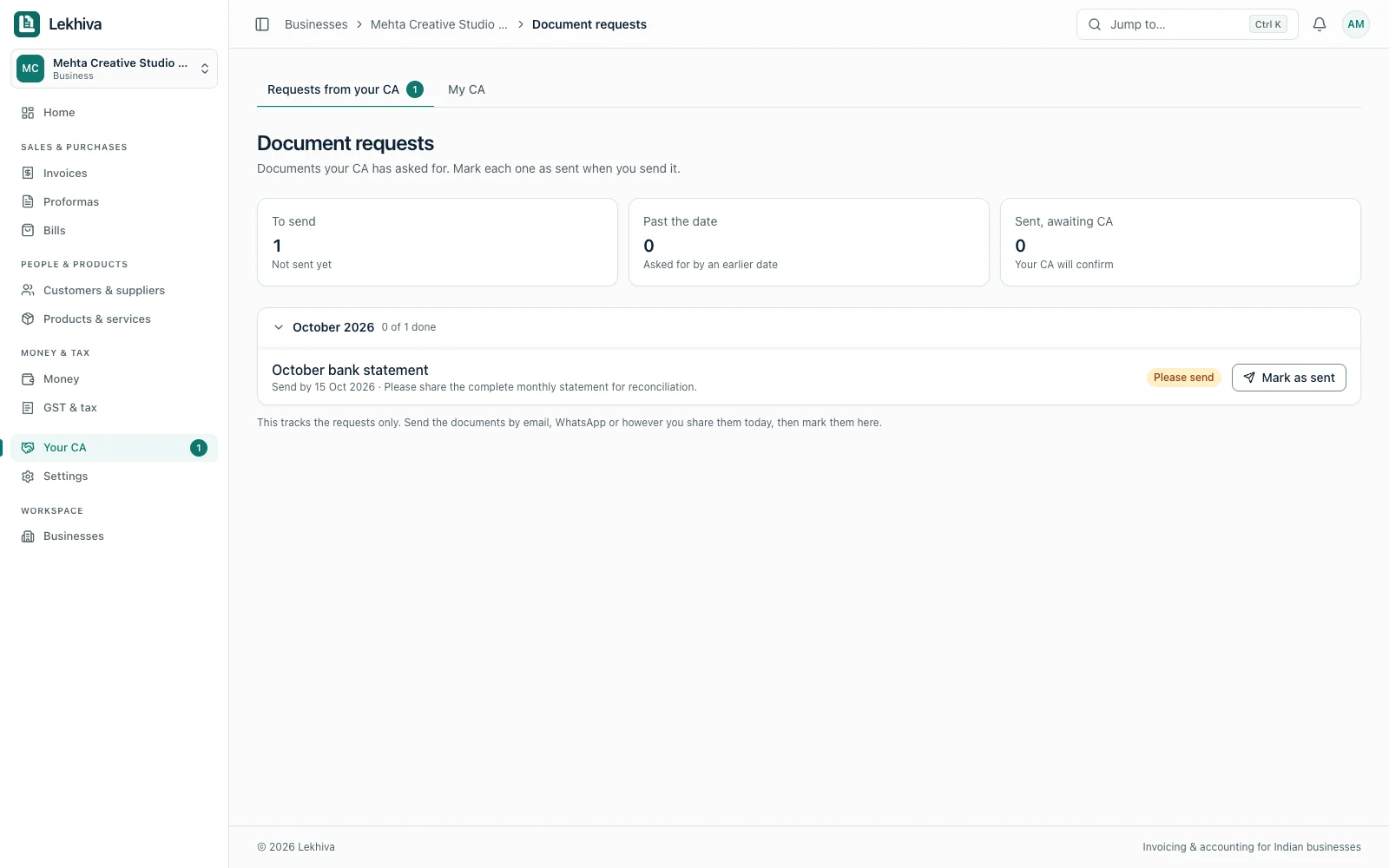
Choose a customer, add items and apply the right GST rate.
Apply a full or partial payment to the invoice and check the remaining balance.
Connect your accountant to approved records and respond to requests for supporting documents.
Bill monthly clients and project milestones, record part payments, and keep vendor bills alongside your sales. When it is time for the monthly review, your CA can work from those records instead of starting with a separate handoff.
Explore invoicing for agenciesPrepare documents, follow up on payments, check GST and organise records for your CA.
Create a preliminary document and print or save it as a PDF.
Create a proforma 02 · Follow upWrite a clear email or WhatsApp message with the outstanding balance.
Draft a reminder 03 · CalculateAdd or remove GST and calculate a tax split using your selected rate.
Calculate GST 04 · CreateCreate a multi-item invoice draft with GST splits, then print or save a PDF.
Create a GST invoice 05 · Prepare for your CATick off records and note questions for your accountant directly on the website.
Open records checklist 06 · Track paymentsReview partial payments and overdue balances, then export your invoice list.
Track invoice paymentsPractical guides for preparing documents, tracking payments and organising business records.
The essential fields, numbering rules and practical checks before you send an invoice.
Read guideUnderstand which tax split applies when you sell within or outside your state.
Read explainerA practical monthly checklist for cleaner books and easier accountant handoffs.
View checklistKeep shared versions clear and record which revision your customer accepted.
Read revision guideFollow multiple receipts against one invoice and check the remaining balance.
Read payment guideKeep a reusable file for receipts, overdue invoices and follow-up dates.
View payment templateBusiness plan benefits are free until 31 December 2026. After that you move to the Free plan (1 business, 100 invoices a month) unless you choose Business from about ₹250 a month billed yearly or Pro, with prices including 18% GST. See the pricing page for details.The Free plan has no time limit (1 business, 100 invoices a month). Business starts at about ₹250 a month billed yearly, and Pro is also available, with prices including 18% GST. See the pricing page for details.
Lekhiva is an invoicing and accounting application for Indian service businesses and their CAs. You can create proformas and invoices, track payments and bills, and work with your CA in a shared workspace. Sign up free at app.lekhiva.com.
Yes. You can create GST invoices in the Lekhiva app, and the free GST invoice generator on this site prepares a calculated invoice draft without an account. The free proforma generator prepares preliminary documents, not tax invoices; the GST calculator checks the tax split.
No. Lekhiva helps you prepare: GST estimates, a due-date calendar, a GSTR-1 working sheet and GSTR-2B matching against your bills. You file returns on the GST portal or through your CA.
Yes, if you approve it. You invite your CA, choose what they can access, and they work from the same records. You can remove their access at any time.
Eight free tools work without an account: the GST calculator, GST invoice generator, proforma invoice generator, quotation generator, payment reminder generator, invoice payment tracker, monthly records checklist and customer statement generator. They are standalone tools, not the full accounting application.
Our initial focus is small Indian service businesses, including agencies, freelancers and consultants, and the CA firms that work with them.
Sign up free and invite your CA. Business plan benefits are free until 31 December 2026.
After that you move to the Free plan unless you choose to pay. See pricing or read the offer details.
See pricing for plans and limits.